
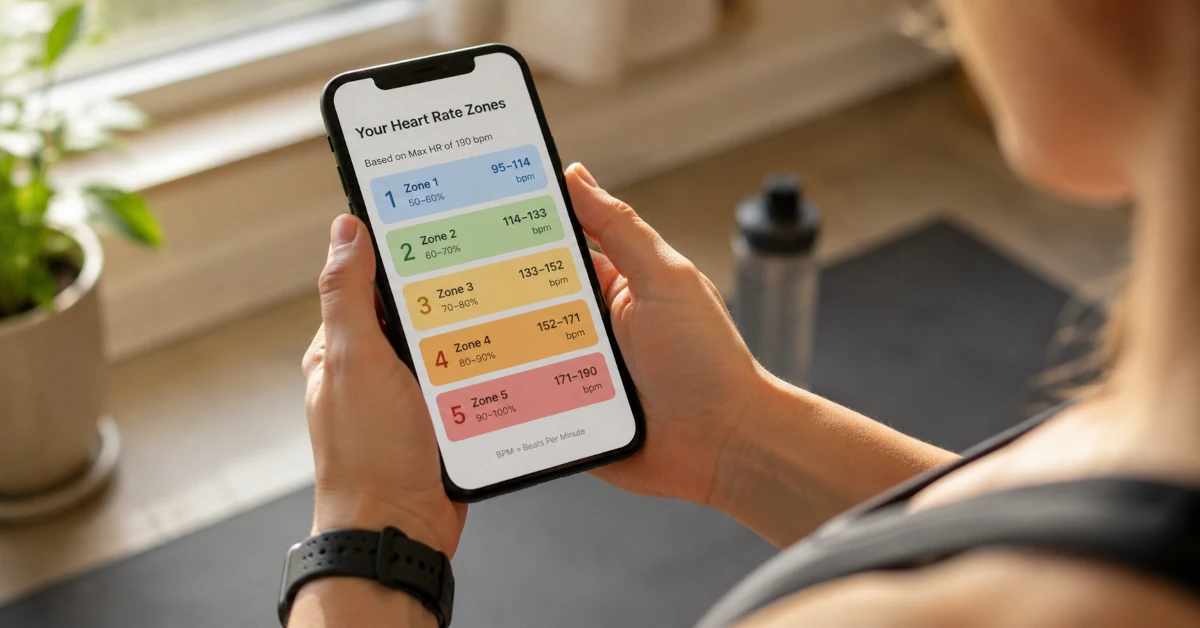
Most people open the calculator, type in an age, and stop there. That's fine for a rough answer, but this site has 3 tools working together: the main Karvonen calculator, 5 separate Max HR calculators, and a resting heart rate tracker. Used on its own, each one is useful. Used together, they produce training zones that are genuinely yours instead of a generic estimate for someone your age.
Here's how the pieces fit, in the order you'd use them.
Start with the Calculator on the Homepage
The calculator on the homepage is the main event. It takes 3 inputs, 2 of which are optional, and turns them into 5 training zones: age, resting heart rate, and max heart rate. You can get a usable answer with only your age, but each additional field you fill in makes the result more specific to your fitness level rather than a population average.
If you're brand new to heart rate training, our beginner's guide to exercise heart rate zones covers the same 5 zones with simpler pacing cues before you get into the calculator mechanics below.
Step 1: Enter Your Age
Age is the only required field. Behind the scenes, it sets a default max heart rate of 220 minus your age, which is the classic starting point most people have seen on a gym wall chart. It's a reasonable first guess, with a margin of error of roughly plus or minus 10 to 12 bpm. That's fine for a first pass and a poor substitute for the more targeted formulas covered further down.
Step 2: Add Your Resting Heart Rate
This is the field that changes the most. Leave it blank and the calculator sets your zones as flat percentages of max heart rate. Fill it in and the calculator switches to the Karvonen formula, which uses your heart rate reserve (the gap between your max and resting heart rate) instead. Two people the same age can end up with meaningfully different zones once resting heart rate enters the picture, because it reflects their cardiovascular fitness rather than how many birthdays they've had.
Measure it first thing in the morning, before you get out of bed. Lie still, find your pulse at your wrist or neck, and count for a full 60 seconds. Most adults land somewhere between 50 and 80 bpm. The full guide to resting heart rate covers what a healthy number looks like and why athletes tend to run lower.
- Max HR (default) = 220 − 45 = 175 bpm
- Heart rate reserve = 175 − 64 = 111 bpm
- Zone 2 (60–70%) = 64 + (0.60–0.70 × 111) = 131–142 bpm
Step 3: Decide What to Do About Max HR
The Max HR field is optional, and it's the one most people skip without realizing what they're leaving on the table. If you skip it, the calculator quietly uses 220 minus your age. That's a population average built for simplicity, not accuracy, and the American Heart Association's own target heart rate guidance treats it the same way: a starting estimate, not a precise figure.
If you've had your max heart rate measured directly, in a lab test or an all-out race effort, type that number in and skip the formulas entirely. It's the most accurate input you can give the calculator. If you haven't, one of the 5 dedicated Max HR calculators on this site will usually get you closer than the default.
The 5 Max HR Calculators, and Which One Fits You
Every one of these produces a single number: your estimated max heart rate. That number then goes into the Max HR field on the main calculator. None of them replace the homepage calculator. They feed it a better estimate than 220 minus age. For how the formulas compare on accuracy, see the max heart rate calculator comparison.
| Formula | Equation | Best for |
|---|---|---|
| 220 Minus Age | 220 − age | A quick, rough baseline. Widest margin of error of the 5 |
| Tanaka | 208 − (0.7 × age) | A solid general-purpose upgrade for most adults |
| Nes | 211 − (0.64 × age) | Max HR measured in 3,320 adults in 1 study, not pooled from earlier studies |
| Gulati | 206 − (0.88 × age) | Women, since it's built from women's data specifically |
| Oakland Nonlinear | 191.5 − (0.007 × age²) | Adults over 55, where the decline in max HR speeds up |
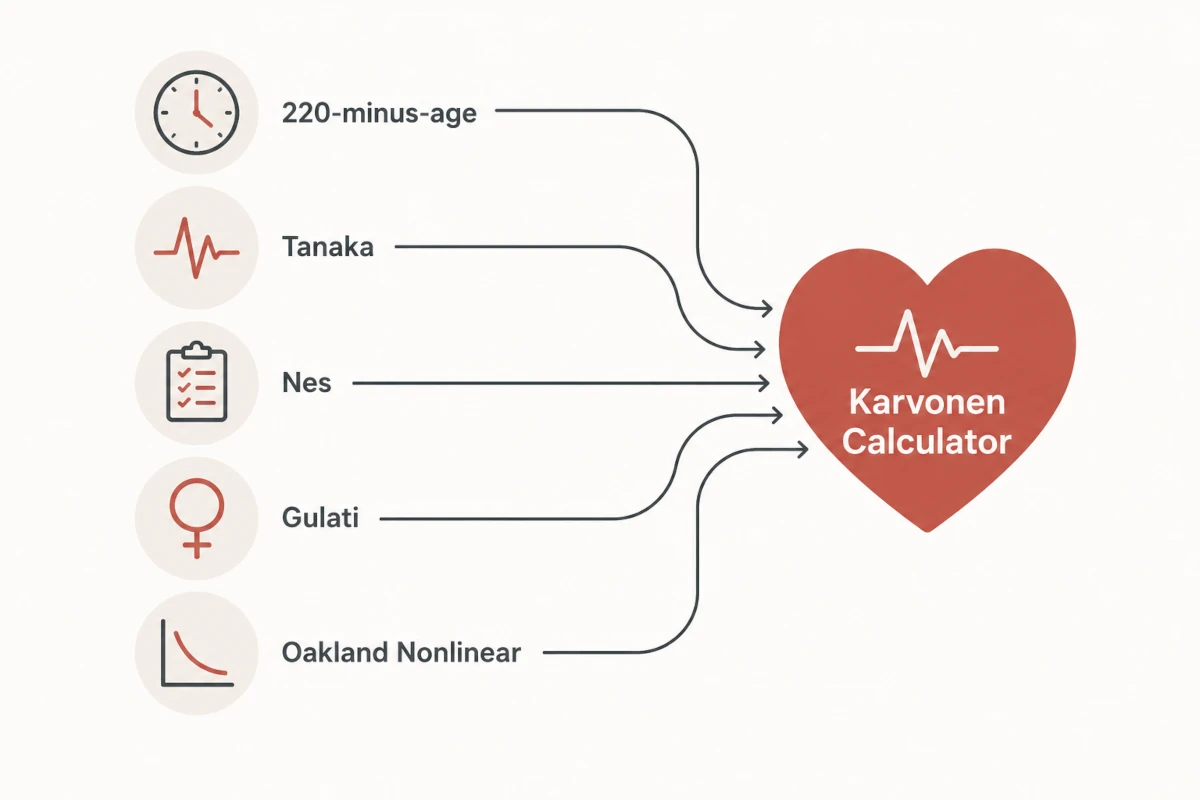
How a Max HR Result Gets into the Karvonen Calculator
Calculate your max heart rate on any of the 5 formula pages first. Once you press calculate there, the site remembers that result. Go back to the homepage afterward and the Max HR field is already filled in for you, no retyping required. If you'd rather do it by hand, or your number came from somewhere else entirely, like a coached lab test, you can always type it into the Max HR field directly.
- Gulati Max HR = 206 − (0.88 × 45) = 166 bpm
- Heart rate reserve = 166 − 64 = 102 bpm
- Zone 2 (60–70%) = 64 + (0.60–0.70 × 10²) = 125–135 bpm
Compare that to the age-only example above (131 to 142 bpm using the default 220-minus-age): swapping in a female-specific Max HR formula shifted this reader's Zone 2 down by roughly 6 to 7 bpm. That's the entire point of running a dedicated Max HR calculator before you commit to zones. For more on how the site's Max HR estimates change by age, the chart there lays out all 5 formulas side by side.
Step 4: Read Your 5 Training Zones
After you press Calculate My Zones, the results show your max heart rate, your heart rate reserve, and a list of 5 zones from easy recovery up to max effort. Each zone lists a bpm range you can compare against a fitness watch or a manual pulse check mid-workout. Buttons underneath let you copy the list, share it, or print it for a coach or training log. If you're a coach working with multiple clients, our guide to using this tool for coaching covers that workflow specifically. If you want a plain-English breakdown of what each of the 5 zones is for, this guide covers all 5 in detail, including which one is generally considered the fat-burning zone.
Mayo Clinic's guidance on measuring exercise intensity is a useful sanity check here: if a zone feels wildly off from how hard the effort feels, it's worth double-checking the inputs before trusting the number over how your body feels.
Log Your Resting Heart Rate to Track Progress
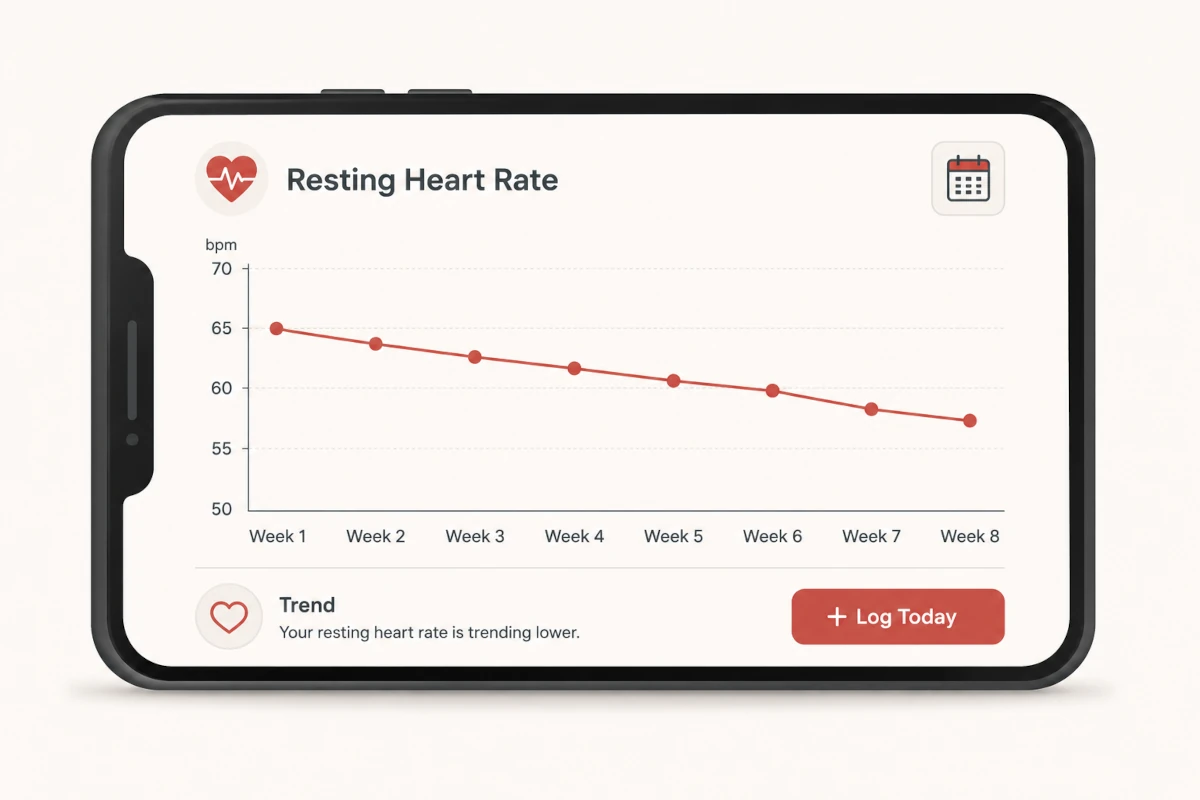
Scroll past the calculator and you'll find a second, separate tool: the resting heart rate tracker, labeled Your Fitness Progress. This isn't part of the zone calculation itself. It's a simple weekly log. Tap + Log Today, enter that morning's resting heart rate, and save it. Over a few weeks, the entries build into a trend line.
A dropping resting heart rate over time is one of the most reliable, low-effort signs that your cardiovascular fitness is improving. It usually means your heart is pumping more blood per beat and doesn't need to work as hard at rest. The guide to lowering your resting heart rate goes into what drives that change and roughly how long it takes.
How Often to Recalculate
Recalculate your zones every 4 to 6 weeks, or as soon as your logged resting heart rate moves by 3 or more bpm from what you originally entered into the calculator. Zones built from a resting heart rate of 72 stop being accurate once that number drops to 62 a few months into steady training. The tracker makes that shift visible instead of leaving you guessing, which is the main reason to use the 2 tools together instead of calculating once and never coming back.
Frequently Asked Questions
Which heart rate zone calculator accounts for my actual fitness level, not just my age?
The Karvonen calculator on this site does, as long as you enter your resting heart rate. Age-only calculators, including 220-minus-age and every other Max HR formula on its own, treat everyone the same age identically. Adding your resting heart rate switches the math to the Karvonen formula, which uses your heart rate reserve (max HR minus resting HR) to build zones that reflect your real cardiovascular fitness, not only your age. Two 45-year-olds with different resting heart rates get meaningfully different zones from Karvonen, but identical zones from an age-only formula.
Do I need to know my max heart rate before I use the calculator?
No. Leave the Max HR field blank and the calculator estimates it as 220 minus your age. That estimate carries a margin of error of roughly plus or minus 10 to 12 bpm, which is fine for a first pass. If you want a tighter number, use one of the 5 Max HR calculators and enter that result instead.
Which Max HR formula should I use?
Tanaka is a reasonable default for most adults. Use Gulati if you're a woman, since it's derived from women's data rather than a male-dominated dataset. Use Nes if you want a formula built from max heart rates measured directly in 3,320 adults, rather than averages pooled from earlier studies. Use the Oakland Nonlinear formula if you're over 55. 220-minus-age is fine as a rough starting point but carries the widest margin of error of the 5.
How do I get my Max HR calculator result into the Karvonen calculator?
Calculate your Max HR on any of the 5 formula pages first. The site remembers that result, so the Max HR field on the homepage fills in automatically when you go back. You can also type the number in by hand if it came from somewhere else, like a lab test.
Why does the calculator ask for my resting heart rate if it's optional?
Without it, the calculator falls back to flat percentages of max heart rate, which treats a conditioned athlete the same as someone new to exercise. Adding your resting heart rate switches the math to the Karvonen formula, which factors in your actual heart rate reserve.
Is logging my resting heart rate the same thing as calculating my zones?
No, they're 2 separate tools that work together. The calculator produces your training zones from the numbers you enter that day. The resting heart rate tracker further down the page is a weekly log you use to watch the trend over time and know when it's time to recalculate.
How often should I recalculate my heart rate zones?
Every 4 to 6 weeks, or as soon as your logged resting heart rate shifts by 3 or more bpm from what you originally entered. As aerobic fitness improves, resting heart rate typically drops, and your zones need to shift down with it.
This article is for informational purposes only and does not constitute medical advice. Please consult a physician or certified fitness professional before starting a new exercise program.